BLUETTI Power Stations 2026: AC180, Elite 400 & Apex 300 Reviewed for California Homeowners
BLUETTI AC180 Review 2026:
$499, Real Specs
& Honest Verdict
The BLUETTI AC180 has been discontinued by BLUETTI as of 2026 — this review stays up because the specs and comparisons below are still accurate and useful for research. If you want to buy today, the BLUETTI Elite 100 V2 ($499) is the closest current replacement, and if you're a PG&E or SCE customer, it may qualify for a $200–$500 utility rebate the AC180 never had.
BLUETTI has discontinued the AC180. It's no longer available anywhere, including directly from BLUETTI. We're keeping this review live because the specs, runtime data, and competitor comparisons below are still accurate reference material — but every "Buy" link on this page now points to the BLUETTI Elite 100 V2, the closest current model at a similar price.
One thing worth knowing before you buy: unlike the AC180, the Elite 100 V2 can pair with a real utility rebate — but which one depends on your utility. SCE customers: the Elite 100 V2 itself qualifies for SCE's flat $200 rebate. PG&E customers: the Elite 100 V2's 1,024Wh capacity is just over PG&E's 1,000Wh cap, so it doesn't qualify there — the EcoFlow River 2 Pro ($349) does, confirmed against PG&E's own approved product list.
The Elite 100 V2 lands in the same price bracket the AC180 occupied, with nearly identical output and recharge speed — enough capacity to run a refrigerator through a 10–16 hour outage, 1,800W for power tools and medical devices. It's the practical successor if the AC180 was on your shortlist.
The BLUETTI AC180 was the most-searched portable power station in its class for two years, and this page still gets found by people looking up its specs, price, and how it stacks up against the EcoFlow Delta 2 and Jackery 1000 V2. Since BLUETTI has discontinued it, we've kept the research below intact — it's still useful for understanding what made the AC180 a strong mid-range pick, and it directly informs why the Elite 100 V2 is the right replacement to consider instead.
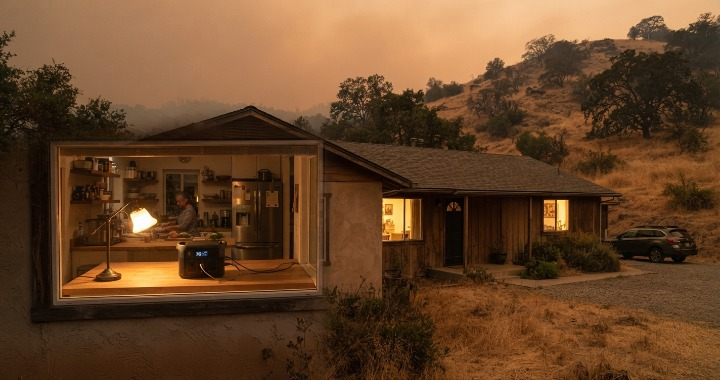
California's Public Safety Power Shutoff program, which the CPUC expanded statewide to reduce wildfire risk during high-wind conditions, means PG&E, SCE, and SDG&E customers routinely face planned outages that a phone charger and a flashlight won't get you through. Everything below — the real specs, what a unit like this actually runs during an outage, and how it compares to competitors — still applies whether you're evaluating the historical AC180 data or its replacement.
What Were the BLUETTI AC180 Specs?
| Battery Capacity | 1,152Wh (1.152kWh) — LiFePO₄ chemistry |
| AC Output | 1,800W continuous, 2,700W surge (Power Lifting mode) |
| AC Ports | 4× AC outlets (standard US) |
| USB-A / USB-C | 2× USB-A (12W), 2× USB-C (100W PD) |
| DC Output | 1× 12V/10A car port, 2× DC5521 |
| Solar Input | Up to 500W (VOC 12–60V, 15A max) |
| AC Recharge Speed | 0–80% in 45 minutes (TurboBoost, 1440W input) |
| Full Charge Time | ~1.5 hours via AC |
| Battery Cycles | 3,500+ cycles to 80% capacity (~10 years daily use) |
| Weight | 35.3 lbs (16 kg) |
| Dimensions | 14.8 × 10.4 × 11.4 in |
| Display | LED touchscreen — wattage in/out, battery %, time remaining |
| App Control | Yes — Bluetooth + WiFi |
| Warranty | 5 years |
| Availability | Discontinued — see Elite 100 V2 above |
Was the BLUETTI AC180 Worth It? Pros and Cons
- Best value per Wh under $500 — $0.43/Wh beat all direct competitors
- 45-minute recharge was fastest in class at this price
- 1,800W handled refrigerators, CPAP, power tools
- 3,500+ cycles — longest lifespan in its price bracket
- Power Lifting mode ran 2,700W resistive loads (heaters, kettles)
- 5-year warranty — longest standard warranty in the category
- Solar input up to 500W — grid-independent recharge possible
- Ran a fridge for 12–18 hours on a single charge
- 35 lbs — heavier than Jackery 1000 v2 (23 lbs)
- Not expandable — capacity was fixed at 1,152Wh
- Wouldn't run central AC or electric water heater
- App not as polished as EcoFlow's
- No built-in wheel/handle like some larger units
- Now discontinued — no longer purchasable
What Does a Unit Like This Actually Run During a California Outage?
This is the question that matters regardless of which model you're looking at. Spec sheets list watt-hours and output — here's what capacity in this range actually means when PG&E cuts your power. Nationally, the EIA reports U.S. electricity customers averaged 11 hours without power in 2024 — and Californians in wildfire-prone PSPS zones frequently see outages that run well beyond that average. The table below reflects the AC180's 1,152Wh capacity; the Elite 100 V2's slightly smaller 1,024Wh capacity runs a bit shorter on each line, roughly 10–15% less runtime:
| Appliance | Typical Draw | Hours (1,152Wh unit) | Notes |
|---|---|---|---|
| Full-size refrigerator | ~150W avg | 12–18 hrs | Cycles on/off — actual avg is ~60–80W |
| CPAP (no heat) | ~30–60W | 2–3 nights | Most common medical device question |
| Wi-Fi router + modem | ~25W | 40+ hrs | Stays connected through any CA outage |
| Phone charging | ~18W | 60+ charges | Family of 4 covered for days |
| Laptop (15") | ~65W | 17+ charges | Work-from-home through any outage |
| LED lighting (4 bulbs) | ~40W | 28+ hrs | Whole room lighting overnight |
| Box fan | ~50W | 22+ hrs | Critical in CA summer outages |
| Space heater (low) | ~750W | ~1.5 hrs | Use Power Lifting mode; limited runtime |
| Central AC / HVAC | 3,000–5,000W | Won't run | Needs installed battery — see below |
Whether it's a portable unit for outage prep or full solar + battery backup, we'll help you figure out what actually makes sense for your situation — no pressure, no obligation.
Get Your Free Estimate →Turn This Purchase Into $200–$500 Back
Here's something the AC180 never had while it was available: a documented path to a utility rebate. The catch is that the right battery depends on which utility you're with — the Elite 100 V2 and the EcoFlow River 2 Pro each qualify for a different program, not both.
BLUETTI AC180 vs. EcoFlow Delta 2 vs. Jackery 1000 V2 — 2026 Comparison
These were the three units that dominated the mid-range category. Here's the honest breakdown:
| Spec | BLUETTI AC180 | EcoFlow Delta 2 | Jackery 1000 V2 |
|---|---|---|---|
| Price (while available) | ~$499 Wins | ~$549 | ~$649 |
| Capacity | 1,152Wh Wins | 1,024Wh | 1,070Wh |
| AC Output | 1,800W Wins | 1,800W (tie) | 2,000W |
| Recharge Speed | 45 min to 80% Wins | 50 min to 80% | 60 min to 80% |
| Weight | 35.3 lbs | 27 lbs Wins | 23.8 lbs |
| Battery Cycles | 3,500+ Wins | 3,000+ | 4,000+ |
| Solar Input | 500W | 500W (tie) | 800W Wins |
| App Quality | Good | Best Wins | Good |
| Warranty | 5 years Wins | 5 years (tie) | 3 years |
| Value/Wh (while available) | $0.43/Wh Wins | $0.54/Wh | $0.61/Wh |
| Buy | Discontinued | — | — |
Bottom line: The AC180 won on price per Wh, recharge speed, and capacity while it was available. The EcoFlow wins on weight and app polish. The Jackery wins on weight and solar input. The Elite 100 V2 replaces the AC180 at essentially the same price point today.
Need More Power? The Full BLUETTI 2026 Lineup
The Elite 100 V2 is the right answer for most people who were considering the AC180. If your needs are bigger — longer outages, running HVAC circuits, or whole-home backup — here's where the rest of the lineup fits. Code SOLARCODE applies to every model below (5% off, excludes accessories & flash-sale items).
The closest portable equivalent to a Tesla Powerwall. Expandable from 3kWh to 100kWh, 3,000W output, automatic switchover when the grid drops. For California homeowners who want Powerwall-level backup without permits or installation timelines — this is it.
- Expandable to 100kWh — multi-day whole-home backup
- Automatic switchover at outage — no action required
- 3,000W handles most home loads including large appliances
- No permits, no installation, same-day operational
The direct successor to the AC180 at the same price point. Slightly less capacity (1,024Wh vs 1,152Wh) but the same 1,800W output and 45-minute recharge. The pick for most people who landed on this page looking for the AC180.
- Same price bracket the AC180 occupied
- Qualifies for SCE's utility rebate (PG&E customers: see the River 2 Pro instead)
- 1,800W output handles fridges, CPAP, power tools
Stays plugged in 24/7, activates automatically when the grid drops. Designed for homeowners who want plug-and-forget backup without the Apex 300 price tag.
- Always-on pass-through — zero action needed during outage
- 2,600W handles all essential home loads
- Less than Apex 300 if expandability isn't needed
A 3kWh-class unit that genuinely moves between the garage and the campsite. One unit for weekends away and PSPS events.
- Most portable 3kWh-class unit — camping + home emergencies
- 3kWh-class capacity runs fridge + essentials through most CA outages
- Solar compatible — charge independently of grid
Which BLUETTI Is Right for You? Full 2026 Lineup Compared
| Model | Capacity | Output | Best For | Price | Link |
|---|---|---|---|---|---|
| ⭐ Apex 300 | 3kWh+ | 3,000W | Home backup, expandable | From $1,444 | Shop → |
| 🔄 Elite 100 V2 | 1,024Wh | 1,800W | Replaces the AC180 | $499 | Shop → |
| Elite 400 | 3,840Wh | 2,600W | Always-on home backup | $1,299 | Shop → |
| Elite 300 | 3,014Wh | 2,400W | Portable + home combo | $1,099 | Shop → |
🎟️ Use code SOLARCODE at checkout for 5% off any model above (excludes accessories & flash-sale items, valid through 12/31/26, US & CA).
BLUETTI portable stations are excellent for outage prep. But they don't run your HVAC, don't connect to your solar system, and don't recharge automatically. If you want whole-home backup that powers everything — including AC — and recharges from your solar panels without you doing anything, that's a Tesla Powerwall, SolarEdge, or Enphase installed battery. California's installed residential battery storage capacity has grown from under 800MW in 2019 to more than 1,800MW as of early 2025, according to the California Energy Commission — a sign of how many homeowners are moving beyond portable units to permanent systems. We design, permit, and install all three across California. SMUD customers in Sacramento qualify for up to $5,400 per Powerwall in rebates — programs that don't apply to portable units. Use our Powerwall savings calculator to estimate your numbers.
See Installed Battery Options → Or Run Your Solar Estimate →If outages are becoming a regular problem, whole-home solar + battery may make more financial sense long-term than repeated portable purchases. See what it would cost for your specific home.
About the author: Ed Watts is the founder of Solar With Watts, a California solar and home energy company serving PG&E, SMUD, SCE, Pioneer Community Energy, and SDG&E territories. He has 10 years of experience in home energy and battery storage across Northern and Central California.
Affiliate disclosure: This page contains affiliate links to BLUETTI products via the Awin affiliate network and EcoFlow products via the CJ affiliate network. Solar With Watts earns a commission on qualifying purchases at no additional cost to you. The BLUETTI AC180 has been discontinued by the manufacturer; historical specs are retained for reference. Prices listed are approximate and subject to change — verify current pricing before purchasing. Discount code SOLARCODE is provided by BLUETTI and subject to their terms and exclusions. Utility rebate eligibility is determined by PG&E/SCE, not Solar With Watts — see our dedicated rebate pages for details.

Reliable high-speed internet, wherever you live